

Search documentation
No results found. Try a block name or setting label.
Dirigible Mega Menu
Build a mega menu in the block editor: a wide dropdown panel of links, images, or anything else you can put on a page. Add it to your header or mobile menu, and visitors click the menu item to open it.
Mega Menus covers the editor. Settings covers the one Customizer toggle.
Getting started
- Install and activate Dirigible Mega Menu with the Dirigible theme.
- Create a panel under Mega Menus → Add New Mega Menu.
- Add it to a menu under Appearance → Menus from the Mega Menus box.
- Assign that menu to a header or mobile location.
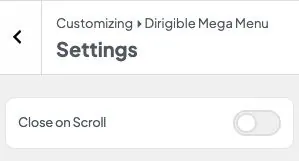
- Optional: turn on Close on Scroll under Appearance → Customize → Dirigible Mega Menu → Settings.
Browse
- Usage Build a mega menu in the block editor, then add it to a header menu item so it opens as a wide dropdown panel on desktop and in the mobile menu.
- Post Types Block-editor panels you attach to a navigation item instead of a page.
-
 Settings
The Customizer toggles that open mega menus on hover and close them when you scroll.
Settings
The Customizer toggles that open mega menus on hover and close them when you scroll.
Built by Dirigible Studio. Get in touch
