

Page SEO
Overview
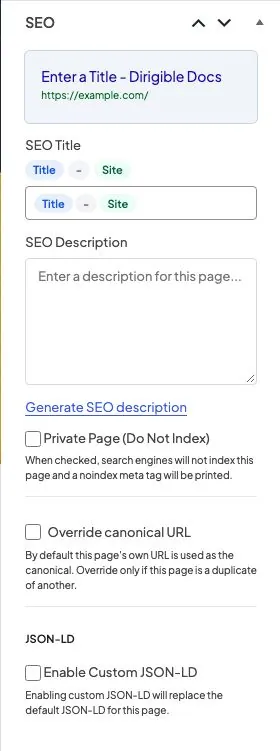
Posts, pages, and other public content get an SEO panel in the editor sidebar. Use it to set how each page appears in search results and social shares. Two previews at the top of the panel update as you type, in the panel and in the page itself.
Where to find it
- Edit a post, page, or any other public item
- In the sidebar's Post (or Page) tab, open the SEO panel. It sits with the other document panels; click its heading to open or collapse it, and the editor remembers which you chose
Content that uses the classic editor gets the same fields as an SEO box in its side column, with the search preview at the top.
The panel also appears on the posts page, the front page, and WooCommerce shop or product pages. Those pages use the SEO fields saved on that WordPress page.
Previews
- Google result — the title and description as search engines will see them: the SEO Title with its pills filled in (or the fallback when it's empty), and the SEO Description (or the excerpt or opening text it falls back to). Change the page title, the excerpt or the SEO fields and the preview follows. Under it, two meters show how much of Google's usual room the title (about 60 characters, 580 pixels) and description (about 160 characters) take; red means the end may be cut off in results. With Private Page on, the preview turns red to remind you the page is kept out of results.
- Social share — the card Facebook, LinkedIn and X build from the page: the share image Dirigible SEO will use (the featured image, else the Default Share Image or the card the theme makes from your logo), with the title and description. A line under the card says where the image came from. Set a featured image and the card updates straight away.
- Use the background as the featured image — when the page has no featured image and its first block has a background picture (a Hero, Section, Cover and the like), a note under the social card offers Use as featured image. Click it to make that picture the featured image, then save the page. When you've just picked the background yourself, the same offer also shows once at the top of the editor. Nothing changes unless you click.
Fields
- SEO Title — use the Title, separator, and Site pills, or type a custom title. Empty titles fall back to the page name, the Title Separator from SEO, and the site name. A static homepage falls back to the site name, separator and tagline from Settings → General (the site name alone when there's no tagline). When the homepage lists your latest posts, it shows the site name, separator and tagline from Settings → General (or Home, the separator and the site name when there's no tagline), and the tagline is its description.
- SEO Description — the meta description shown in search results and social shares. If you leave it blank, Dirigible SEO uses the excerpt, or the first 320 characters of the content. The home page falls back to its excerpt, then the tagline from Settings → General, then the page's opening text, so search results don't keep showing an old announcement from the top of the page when there's a tagline. The posts page uses only its own excerpt (WordPress never shows its text), and search results get no description, so neither borrows the first listed post's.
- Draft with AI — under the description, when the site has an OpenRouter key under Dirigible → AI / OpenRouter (for Authors, Editors and Administrators; Contributors don't see it). It writes a description from the page's own text (what's in the editor right now, saved or not) and puts it in the field for you to check and edit. Nothing is saved until you save the page, so you can discard it or draft again. Pages with only a few words get a note instead of a draft.
- Private Page (Do Not Index) — asks search engines to leave this page out of their results, and leaves it out of the sitemap
- Override canonical URL — turn this on only when this page is a duplicate. Then enter the original URL. The page then drops out of the sitemap, since search engines should index the original. Leave it off to use this page’s own permalink.
- Enable Custom JSON-LD — replace the theme’s default structured data for this page. Only users allowed to post raw HTML (administrators and editors) see these two fields
- Custom JSON-LD — paste your structured data without
<script>tags. It only takes effect when Enable Custom JSON-LD is on and the field is not empty. The panel warns when what's in the field isn't valid JSON; then the theme's structured data stays
Pills in the title field:
- Title — the WordPress title (or term name on archives)
- The separator pill — the Title Separator under SEO → Settings
- Site — the site name from Settings → General
You can also type {year} for the current year, for example in "Best Gift Ideas {year}".
Share image
The share image is the page's featured image (large size). To change the picture a page shares, change its featured image.
A page without a featured image shares the Default Share Image from SEO → Settings, or, when that's empty, the image the Dirigible theme makes from your logo on the brand colour. Dirigible SEO doesn't pick a picture from the page's content: the first image on a page is as often an icon, a logo or a headshot as a picture of the page.
SVG images are skipped, since Facebook, LinkedIn and X don't show them. The image's size and its alt text from the Media Library are shared too. A page with a share image gets a large image card when shared on X. The posts page and the shop use their own page's image; category, tag and search pages use the site-wide share image (the Default Share Image, or the image the Dirigible theme makes from your logo on the brand colour) rather than the first listed post's.
Tips
- Write the description for people, not for keywords. Check it in the preview.
- Date archives (such as
/2024/) are always kept out of search results, since they repeat posts listed elsewhere. - Use Private Page for test pages and anything else that should stay out of Google. With Dirigible theme 5.31.101 or newer, the theme already hides the 404 page, and thank-you pages that a Gravity Forms confirmation sends visitors to when the page address says thank you or confirmation.
- Do not override the canonical unless two public URLs show the same content.
- If Yoast SEO, SEOPress or All in One SEO is active, you can fill these fields, but live tags stay off until that plugin is deactivated.
