

Events
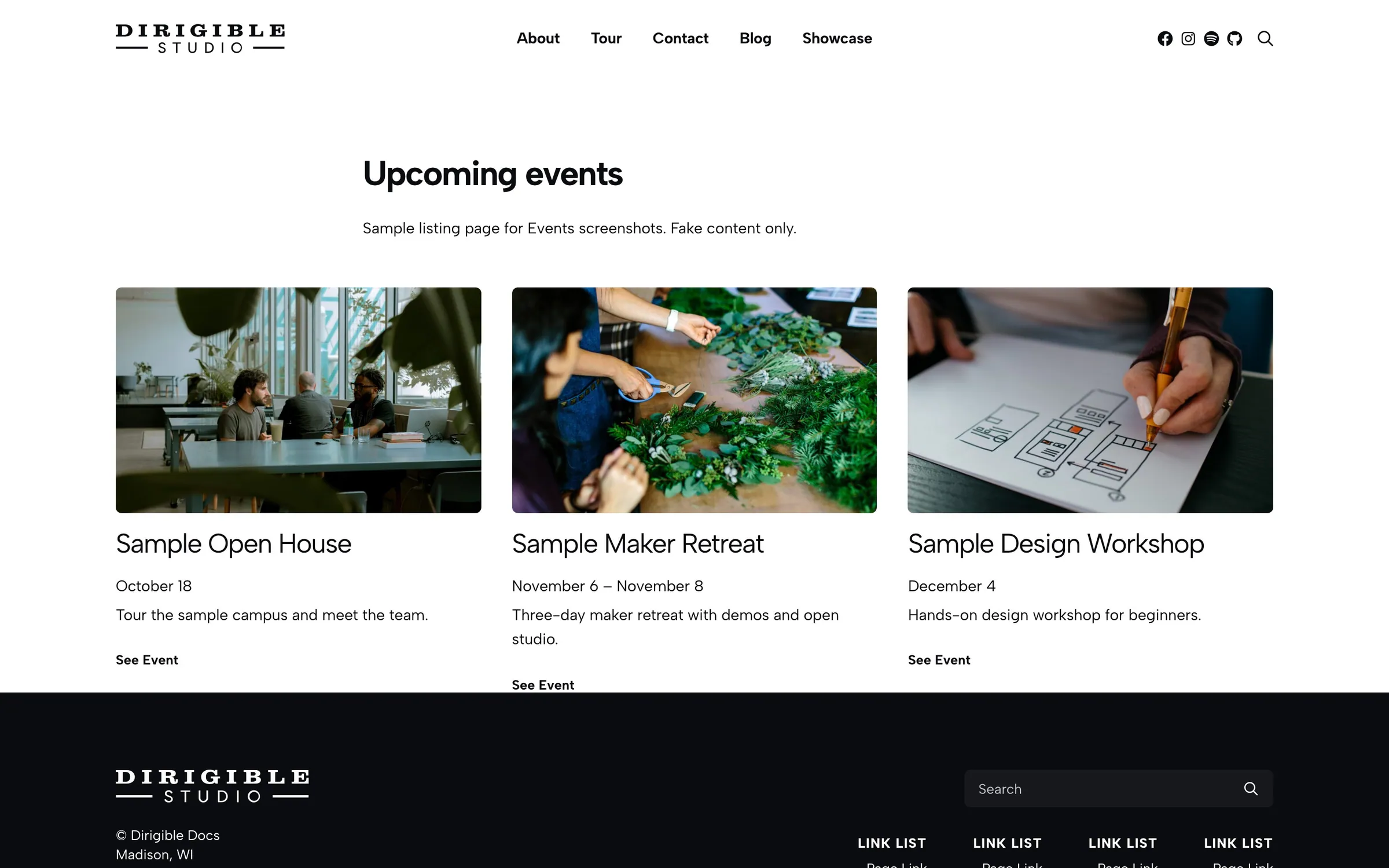
Overview
Everything under Events in the admin lives here. Each event has its own page built inside a Single Event block, a featured image, and sidebar fields for the date, venue, and details search engines read.
For step-by-step setup (creating events, adding listing blocks to a page, recurring series, and ticketing), start under Usage. This page is the reference for the event's fields.
What visitors see
Each event gets its own URL (/events/{post-name}/ by default; change the slug in Events Global Settings). Listing blocks like Events link to these pages. A typical single event shows:
- Event title and formatted start (and optional end) time
- Venue and address (when enabled in Customizer)
- Optional excerpt, map embed, buy button or ticket link, and phone/email/website
- Freeform body content you build with blocks inside Single Event
See Hang Ten — Tarlton Theatre for a filled-out single event in production.
Editor basics
- Fields: title, block content, featured image, excerpt, and revisions
- No archive page: place Events or Events Calendar blocks on a page instead
- URL slug: Customizer Slug (default
events) - Starting layout: every new event opens with a Single Event block and a starter paragraph. Add any blocks inside it; the Single Event block itself can't be removed.
- Organizing: Categories (with parent/child levels) and Tags
Editing an event on its page
The editor shows the event page the way visitors see it, in the layout the page uses. A bar at the top names that layout, with a small drawing of it and a line on what it shows; select Change to pick another from drawings of each layout (with Dirigible theme 5.31.217 or later). Hover a part of the page (the date, the cost, the venue, the photo) and select Edit to change its fields in a pop-up; select Done when you're finished. Your changes show on the page as you type, and save with the event.
- A part with nothing in it shows a short prompt in its place, like No cost, so you can see what you could add. Visitors see nothing there.
- A part the page hides is faded, with a note saying why: a setting in Events → Settings (Show Phone is off in Events → Settings.), the block's Show Excerpt, or a layout that doesn't show it (the Article layout has no photo, venue or contact details).
- The sidebar's Event panel lists the same parts with a one-line summary each (Date & Time: December 4, 1:00 pm - 4:30 pm), and the same Edit buttons. It also has Layout and Search Engine Details, which aren't on the page.
The parts and the fields each one opens:
| Part | Fields |
|---|---|
| Date & Time | Starts, Ends, All day, Recurring Event and its repeat settings |
| Cost | Cost |
| Tickets | Everything in the Ticketing panel (when Enable Ticketing is on) |
| Photo | The featured image |
| Short Description | The excerpt |
| Categories | Event Categories |
| Venue | Location, Venue, Street Address, City, State, Zip |
| Contact | Website URL, Website Title, Email Address, Phone |
| Map | Map Embed |
| Video | Video URL |
| Status | Status: Cancelled, Postponed, Rescheduled and Moved Online show a notice at the top of the event page |
| Lineup | Performers (the Lineup layout shows them; search engines read them) |
| Ticket Link | Ticket Price, Free event, Ticket URL, Ticket Availability, for tickets sold elsewhere (the Box Office layout shows a Get tickets button) |
| Search Engine Details | Attendance Mode, Organizer Name and Organizer URL |
This needs Dirigible theme 5.31.216 or later. With an older theme, the fields are in the Event Information, Ticketing and Event Meta panels of the sidebar, as described below.
Event Information (sidebar)
Core scheduling and venue fields (on the page: Date & Time, Cost, Venue, Contact, Map and Video):
- Starts — required date/time; drives all listing, calendar, and countdown behavior
- Ends — optional; multi-day events and "ongoing" detection use this field
- All day — for an event without times (a festival, an exhibition, a holiday). Starts and Ends become dates only, the event counts as upcoming through the end of its last day, and the event page, lists, calendar, Google Calendar button and search engines show dates without times. Turn it off to set times again.
- Cost — the price as visitors should read it, shown under the date on the event page:
$10,Free,$5–15 suggested. Leave it empty to show nothing. Tickets sold on the site keep their own prices; see Usage → Ticketing. - Location — pick a saved location when Dirigible Locations is active, or choose Custom to type the venue by hand. Linking a location hides the manual address fields.
- Website URL / Website Title — venue or external ticketing site
- Venue, Street Address, City, State, Zip, Phone, Email Address — manual venue details when Location is Custom
- Video URL — YouTube or Vimeo; the Events block can prefer video thumbnails over featured images
- Map Embed — paste a map embed iframe for the single-event layout. Use the embed code from Google Maps (Share → Embed a map), Bing Maps (Share → Embed a map), OpenStreetMap, Mapbox, or a YouTube or Vimeo player. Embed code from any other site isn't saved: the event won't update until you replace or clear it, and the message says which maps and videos work. Paste the bare
<iframe>: links, wrappers and other code around it are left out.
Recurring controls appear on the series parent only — see Usage → Recurring events.
Using the excerpt
Events listing blocks show the Excerpt on each card. Use it for short show details:
- Door time and showtime (
7:30pm // Appleton Beer Factory) - Lineup or bill order (
Hotline TNT, Disq, Cry Baby, Hang Ten) - Ticket or age restrictions
Event Meta (sidebar)
Details that help Google show your event in search results (in the sidebar's Event panel: Search Engine Details). With an older theme, the same fields appear in the Single Event block sidebar under Event Meta.
- Status — Scheduled (default), Cancelled, Postponed, Rescheduled, Moved Online. Anything but Scheduled also shows a notice at the top of the event page (Cancelled: this event won’t take place.). Event lists and the calendar don't show it.
- Attendance Mode — Offline (default), Online, Mixed
- Organizer Name / Organizer URL — defaults to site name and URL when blank
- Performers — name and type (Music Group, Person, Group, Organization). A new performer starts as Group, which suits any act; choose Music Group for a band or Person for someone performing as themselves.
- Ticket Price, Ticket URL, Ticket Availability — for tickets sold elsewhere. These hide when Sell tickets for this event is on. A price of 0 or none is left out of the structured data, since an empty price saves as 0 too. With no Ticket Price, a Cost that names one amount (
$10), a range ($10–20) or saysFreeis used as the price instead. Text that isn't an amount (Donation,$10 adults, $5 kids) is left out. - Free event — turn on to tell search engines the event is free (shown with the ticket fields). With Sell tickets for this event, a ticket price of 0 counts as free on its own.
WooCommerce ticketing is covered in Usage → Ticketing.
Tips
- Always set Starts. Without it, events won't appear in listings or the calendar.
- Set Ends on festivals and multi-day conferences so they keep showing as ongoing.
- For tickets on Ticketmaster, Eventbrite, or similar, leave Sell tickets for this event off and use Ticket URL in Event Meta.
Screenshots
Editor
-
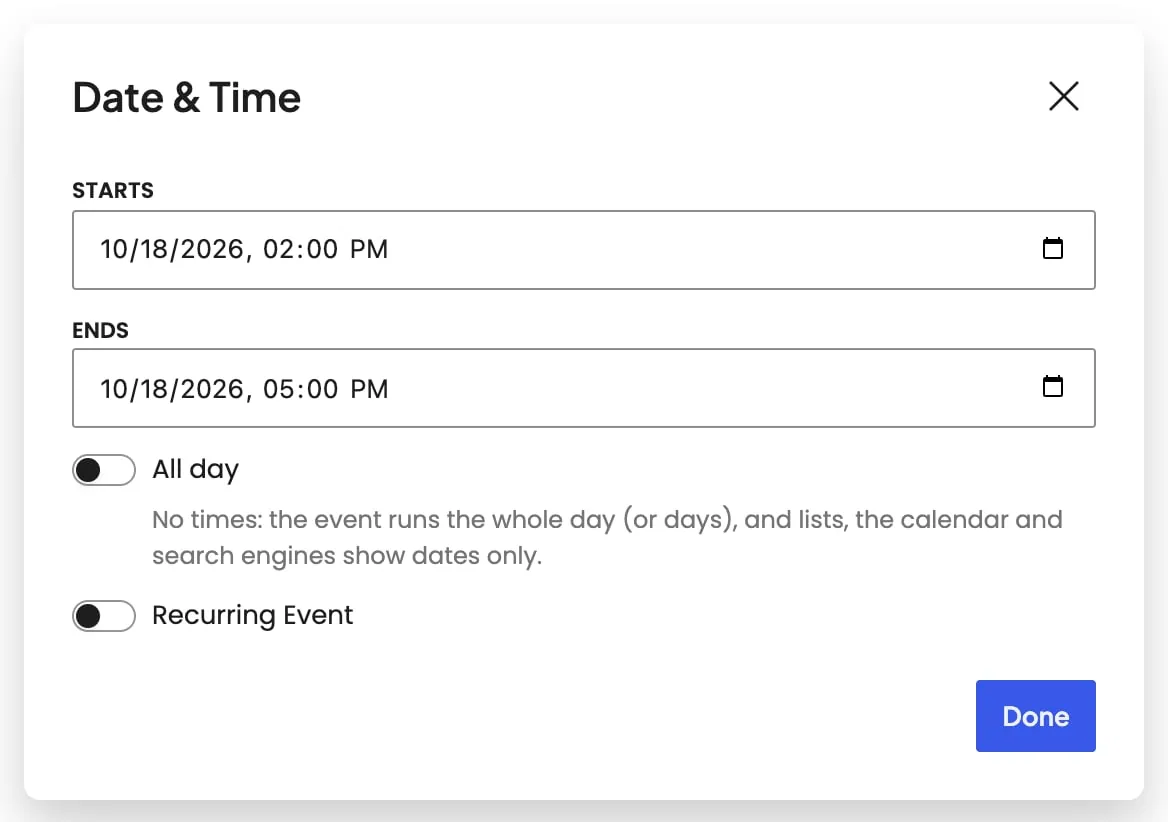
Date & Time pop-up — Starts, Ends, All day, and Recurring Event.
Settings
Event Information: Repeat
How often the series repeats, together with Every (every 2 weeks, every 3 months). The line under the controls says the whole rule in words.
- DailyAn occurrence every day, or every few days with Every.
- WeeklyAn occurrence every week (or every few weeks) on the days chosen under On; with none chosen, on the same weekday as Starts.
- MonthlyAn occurrence every month (or every few months) on the same day of the month as Starts, or on its weekday (the third Wednesday, the last Friday), chosen under On.
- YearlyAn occurrence every year (or every few years) on the same date as Starts, or on its weekday in that month; under In, pick more months for a series that runs in March and September.
Every how many days, weeks, months or years. 1 is every one; 2 is every other.
For a monthly or yearly series: the same day of the month as Starts (the 18th; a shorter month uses its last day), the same weekday (the third Wednesday), or the last such weekday of the month. The choices come from the Starts date. For a weekly series, On is a row of weekday buttons instead: the first date is always Starts, the rest follow the days chosen; a series every 2 or more weeks keeps the chosen days in the same week, counted from the day your site's week begins on (Settings → General).
How the series ends. Dates the series shouldn't run on go under Skip dates below the rule: each one's occurrence moves to the Trash, and removing a date brings it back.
- On a dateRuns through the end of the Last date.
- After a number of timesMakes the number of occurrences under Times, counting the first date.
- NeverNo end: dates are made two years ahead, and a weekly background job keeps adding the next month.
The last date the series should create an occurrence, when it ends on a date.
How many occurrences in all, counting the first date, when the series ends after a number of times.
Ticketing
Sells tickets for this event through WooCommerce. Requires WooCommerce and Enable Ticketing under Dirigible Events → Ticketing in the Customizer.
In the Ticketing panel, this is the price on the buy button. In Event Meta, it's the price search engines see for tickets sold elsewhere; 0 or empty is left out unless Free event is on.
Leave empty to use the default label, which includes the price.
Maximum tickets for this event. With ticket types, this is the shared venue total. Leave empty for unlimited.
Shows how many tickets are left under the buy button.
