

Set up a GDPR cookie consent banner
A cookie consent banner asks visitors to accept before your site loads tracking such as Google Analytics. A banner on its own isn't enough: the tracking has to actually wait for the click. Dirigible has one built in, under Dashboard → Tracking & Privacy, that holds back Google Analytics, Tag Manager, Meta Pixel, and the other tracking IDs until a visitor accepts.
Add your tracking IDs first (see Add tracking codes to your site), then turn on the banner.
Turn on the cookie banner
- Go to Dashboard → Tracking & Privacy.
- Under GDPR Banner, turn on Enable.
- Select Save Settings. If Custom Embeds already holds tracking, the page first asks whether to move it to its ID field, load it only after consent, or leave it for now.
- Go to Appearance → Customize → Scripts & Embeds → GDPR Banner to set the wording and style below, where you see the banner as you edit. Click Publish when the preview looks right.
Write the notice
| Control | What it does |
|---|---|
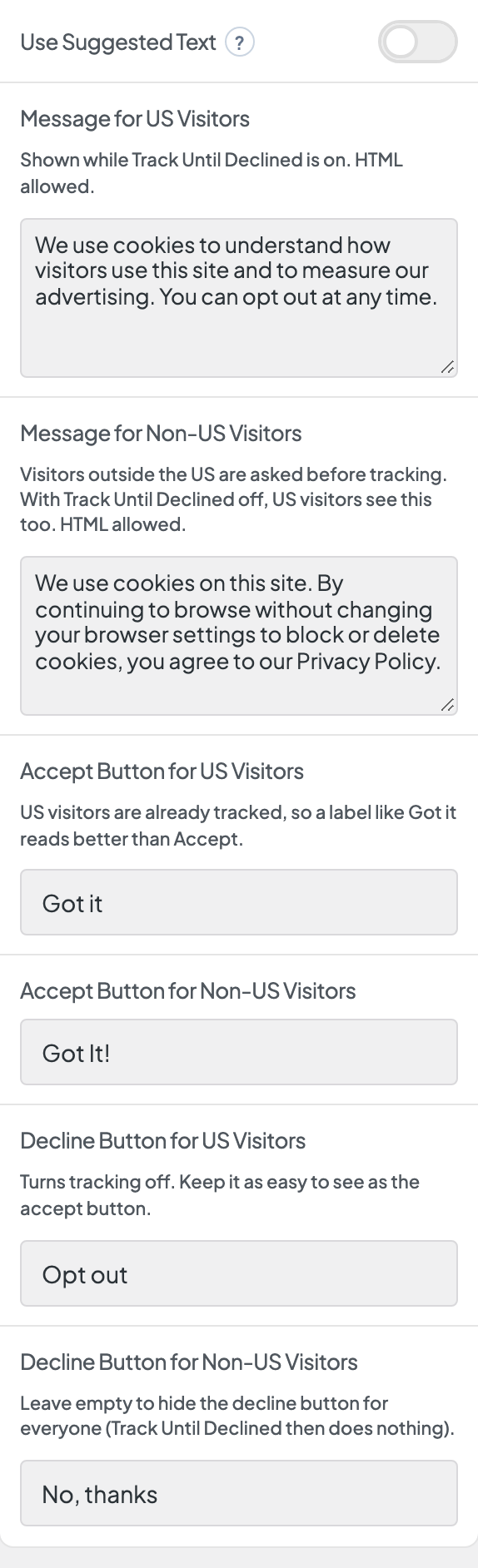
| Use Suggested Text | On by default, with ready-made wording. Turn it off to write your own: the message and button fields only appear while it's off. |
| Message for Non-US Visitors | The message visitors read. Visitors in US time zones see Message for US Visitors instead while Track Until Declined is on. |
| Accept Button for Non-US Visitors | The accept button label (default Got It!). |
| Decline Button for Non-US Visitors | The decline button label (default No, thanks). Leave it empty for no decline button. |
| Show Privacy Policy Link | Adds a link next to the buttons. |
| Privacy Policy Link Text | The link's label (default Privacy Policy). It links to the privacy policy page set in WordPress under Settings → Privacy. |
Each message and button field for visitors outside the US sits next to its version for US visitors.
Style the banner
| Control | What it does |
|---|---|
| Layout | Corner for a small banner, or Centered for a more prominent one. |
| Shadow | Adds a drop shadow. |
| Background | The banner color, from your palette. |
| Reverse Print | Light text, for a dark background. |
What does the banner hold back until visitors accept?
While the banner is on, everything in Dashboard → Tracking & Privacy → Analytics & Tracking (Google Analytics, Tag Manager, Facebook Pixel, and the other ID fields) stays off until the visitor accepts. With Track Until Declined on (the default), visitors in US time zones are the exception: they're tracked until they opt out.
Code pasted into Custom Embeds does not wait, unless Load Pasted Tracking Only After Consent is on under Dashboard → Tracking & Privacy. For anything that needs consent, use an ID field when there is one.
How do I test the cookie banner?
- Open the site in a private (incognito) window.
- Check that the banner appears and no tracking loads before you accept.
- Accept, then confirm your tags fire with your analytics tool's debugger.
The visitor's choice is saved in their browser, so use a fresh private window each time you retest.
This banner controls Dirigible's tracking codes. It isn't legal advice, so check what your region requires.
