

Structured Data for Search Engines
What it helps you do
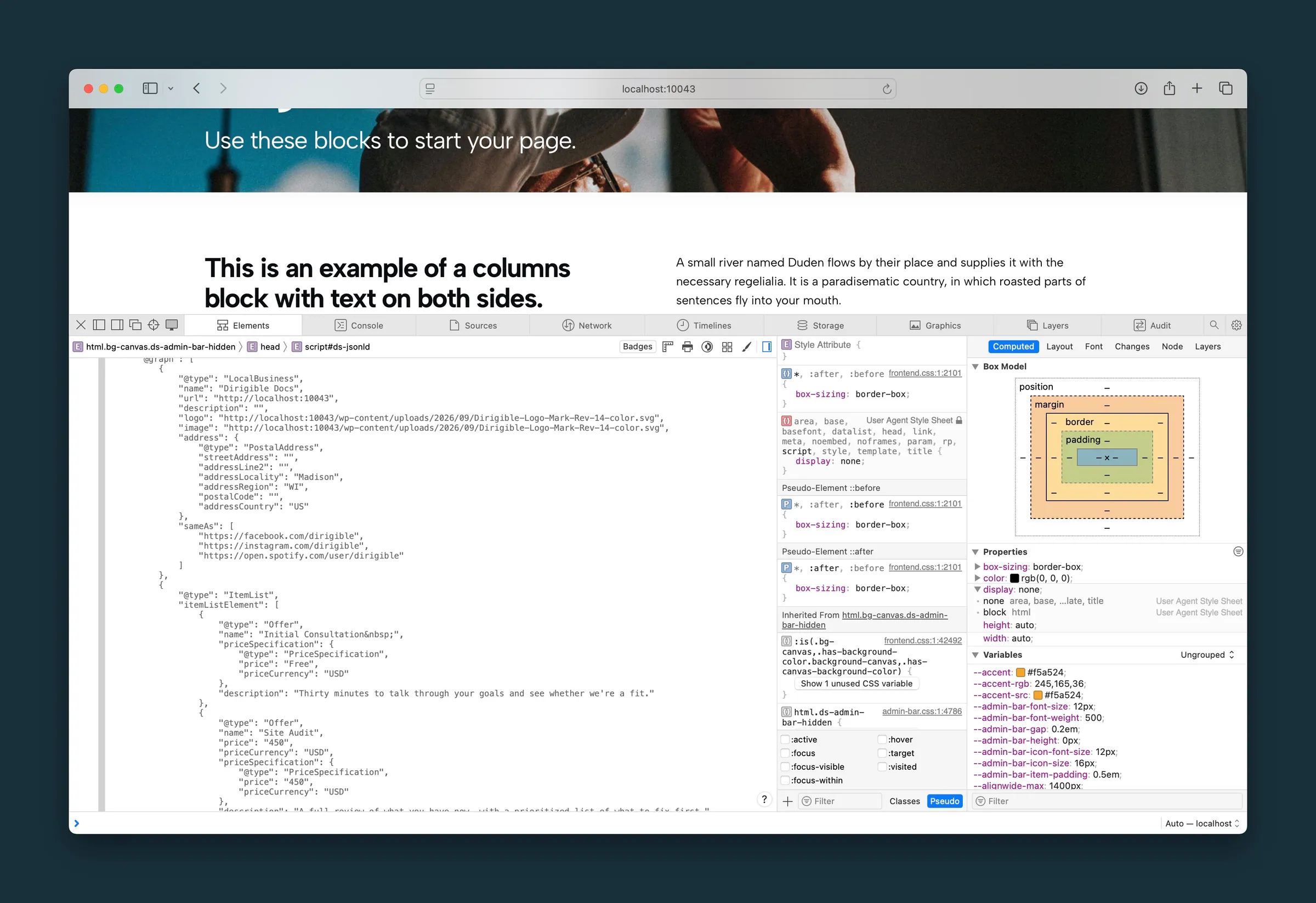
Tell search engines about your business and content (contact details, blog posts, FAQs, breadcrumbs, and more) so they can show richer search results. Dirigible adds this structured data (schema markup) for you.
Where to find it
Structured data is added to your pages automatically. It comes from settings you already fill in:
- Settings → General in the WordPress admin: your Site Title and Tagline become the business name and description.
- Appearance → Customize → Footer & Contact → Contact Information: address, phone, and email.
- Appearance → Customize → Settings → Social Media: your social profiles, linked to your business.
- Appearance → Customize → Header & Menus → Logo: your logo.
- Block editor: FAQ, Breadcrumbs, Price List, Yearbook, and other Dirigible blocks add their own details.
- Dirigible SEO plugin (when installed): page-level SEO titles and meta descriptions. It works alongside the theme's structured data without repeating it.
How to use it
- Fill in Contact Information and Social Media so your business details are accurate.
- Publish blog posts with titles, excerpts, featured images, and authors. Each post is marked up as an article automatically.
- Use the FAQ block for questions and answers. Search engines and AI answers can read them as an FAQ, which helps them understand the page. Google now shows FAQ rich results only for well-known government and health sites, so don't expect expandable questions under your listing.
- Add Breadcrumbs to inner pages to show visitors and search engines where the page sits on your site.
- Install Dirigible SEO when you need per-page titles, meta descriptions, and social sharing previews.
To see what search engines get, run a page through Google’s Rich Results Test.
What happens automatically
- Every public page can include structured data, combining your site-wide business details with details about that page.
- Your business details (site title, tagline, logo, address, phone, email, and social profiles) are shared as a local business. Google needs a street and city for that, so a site with neither (a band, a blog, a nonprofit) is shared as an organization instead, with the same details. Dirigible SEO can set another type.
- A local business also gets a map link (a Google Maps search for its address), and, for an address in the US, its map location from the US Census geocoder. The address is looked up once, in the background, a few minutes after you publish a new address; until then (and for an address outside the US, or one the Census can't find) only the map link is shared. Changing the address drops the old location until the new one is found.
- The site itself is shared as a website, with its name, address and language, so Google can show the site name in results.
- Single blog posts are marked as blog articles with the author, dates, and featured image when available.
- FAQ blocks are shared as an FAQ. Several FAQ blocks on one page combine into one. The whole question counts, bold or italic words included, and an answer keeps everything in it (lists, columns, headings), each list item as its own sentence.
- Breadcrumbs, price lists, and yearbook blocks add their own details when they're on the page.
- YouTube videos in Embed blocks are shared as videos, with the video's title, its YouTube thumbnail, and the page's publish date. Click-to-load shows visitors a thumbnail instead of the YouTube player, so this is how search engines learn the video is there. A caption on the Embed block becomes the video's description; without one, the page's excerpt is used.
- The data refreshes when you update a post or publish Customizer changes. Pages that show details from other content refresh too, without being re-saved: a renamed category or author, an edited FAQ answer, a parent page's new title, or an event's updated location reaches every page that uses it.
Things to know
- Structured data helps search engines understand your site. It doesn't guarantee rich results or better rankings.
- Only FAQ blocks count as FAQs. The Accordion block, and accordions built from other blocks, aren't included.
- Only Embed blocks count as videos: YouTube videos in Grid cards or pasted as embed code in a Custom HTML block aren't shared. A page shares up to 10 videos, and a video embedded twice is shared once. Playlists aren't included.
- A video you've just added is shared from the page's second view, because WordPress looks up the video's title the first time the page shows it. Viewing the page yourself after you save takes care of that first view.
- Keep your contact details current. An outdated phone number or address is shared with search engines too.
- Only the address is sent to the US Census geocoder, and only when it changes. Nothing is looked up while visitors view pages.
- Your host caches whole pages. When you change something that other pages show (an FAQ answer, an author, a location), those other pages can keep the old details until their cache clears. Purge the site cache if you need the change to show right away.
- Dirigible SEO handles titles, meta descriptions, and the editor SEO panel. The theme still provides the structured data.
