

Tools & Maintenance
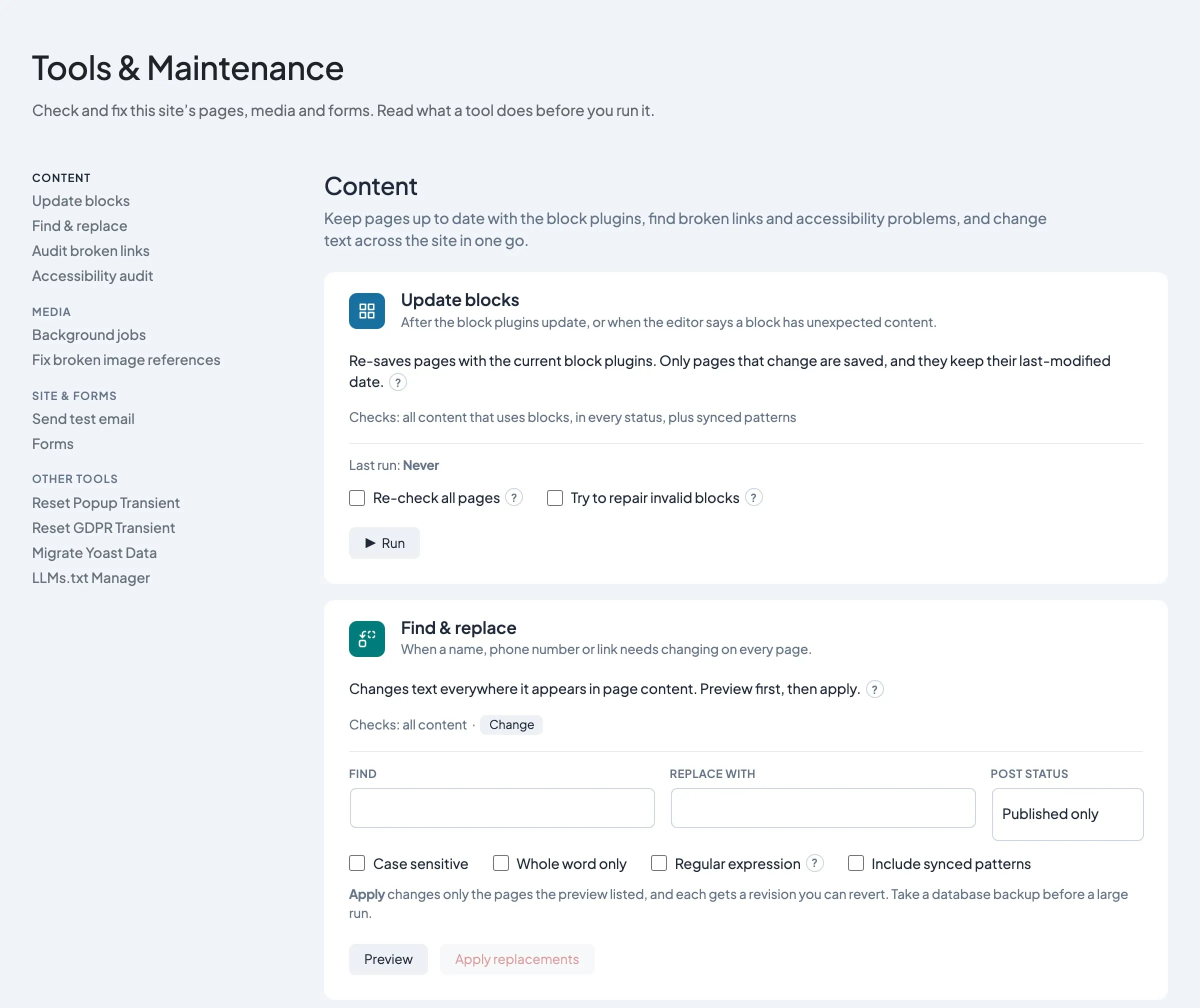
What it helps you do
Run sitewide housekeeping from one screen — update old blocks, audit links, fix broken images, check your forms, and test that the site can send email — without installing separate plugins or writing SQL.
Where to find it
- Click Dirigible in the WordPress admin sidebar: it opens Tools & Maintenance.
The list on the left shows every tool, grouped into Content, Media, Site & forms and Other tools. Click a name to jump to that tool and open it. The tools sit in one column on the right. Each one says when to use it; click it to see what it does and its options before you run it. On a phone the list sits above the tools.
- Content: Update blocks, Find & replace, Audit broken links, Accessibility audit, and Restore block settings from revisions when a site has blocks waiting for review.
- Media: the background jobs (media indexing, and new image sizes when Dirigible Optimize is active), Fix broken image references.
- Site & forms: Send test email and Forms (with Gravity Forms active).
- Other tools: one-off resets and imports added by Dirigible plugins and theme features, such as Reset Popup Transient, Reset GDPR Transient, Reset Documentation Gating, Migrate Yoast Data and the LLMs.txt Manager. These used to be on a separate Dirigible Theme Tools page; old links to it now open this group.
Administrators see every tool. Managers see everything except the tools that make sitewide or permanent changes: Find & replace and Forms → Entry cleanup. Managers can preview Fix broken image references and Restore block settings from revisions, but only Administrators can apply them.
How to use it
- Open Dirigible → Tools & Maintenance.
- Pick a tool from the list on the left, or read the "when to use this" line under each tool's name.
- Every tool is open on the page, with its options and buttons showing. Find & replace, Audit broken links and the Accessibility audit check all content by default: click Change next to Checks: all content to pick types, such as only Posts and Pages. Each tool remembers its choice in your browser. Then click Run, Preview or Scan.
- Click ? next to a tool's description or an option to read more about it; click it again, press Esc or click elsewhere to close it.
- Read the log panel for results, edit links, and download buttons.
- For destructive or write tools, scan first, review the preview, then confirm.
Common tasks
| Goal | Tool |
|---|---|
| Old block markup after a plugin update | Update blocks |
| Blocks lost their settings (colors, layout, image links) but kept their text | Restore block settings from revisions |
| Broken links in page content | Audit broken links |
| Quick WCAG triage on rendered pages | Accessibility audit |
| Check the site can send email (before requiring two-step login, or after SMTP changes) | Send test email |
| Gravity Forms notification issues | Forms → Settings check (when Gravity Forms is active) |
| Lots of draft posts from a form | Forms → Settings check lists each form with Post Fields and how many drafts it left |
| Spam, trash or old form entries piling up | Forms → Entry cleanup (Administrators) |
| Make every visitor see the popup or consent banner again | Other tools → Reset Popup Transient / Reset GDPR Transient |
What happens automatically
- New image sizes are added to existing images by themselves (with Dirigible Optimize active). When a theme or plugin update adds an image size, a background job in Dirigible Optimize adds it to the images already in your library, a few at a time, starting with the ones your pages show first. Existing files are never changed or removed. Progress shows under Media on this screen (Adding new image sizes), and a short message appears when it's done. Deactivating Dirigible Optimize pauses the job and hides its line; it picks up where it left off when you reactivate. See Images in Dirigible Optimize.
- Images are indexed by themselves, so the same file can't be uploaded twice. New uploads are indexed as they arrive, and older images a few at a time in the background. Progress shows under Media (Media indexing).
- The Media status lines have buttons. Run now does the next batch straight away instead of waiting a couple of minutes. Retry stalled appears if a job stopped after repeated failures: it clears the failures and tries those images again. Retry skipped re-checks images that were skipped because their file was missing, in case the file is back.
- Image alt text from the Media Library fills in on your pages. When an image on a page has no alt text but the same image has alt text in the Media Library (typed there or added by Dirigible AI), the page shows the library's text. Alt text typed into a block always wins, and nothing in your content is changed. Icons left with empty alt text, and images marked as decorative, stay silent. To keep any other image silent for screen readers, leave its alt text empty in the Media Library too. Cached pages pick up new library text when the cache refreshes. This also covers Instagram feed photos (the caption, then the library's alt text, then "Instagram post by @account" and the date), and images whose block points at a media item that no longer exists, such as content copied from another site (they're matched by file instead). The placeholder icons for posts and people without an image stay silent. Header and footer logos always use your site title as their alt text, since a logo should name the organisation rather than describe the picture.
- Restore block settings from revisions runs once in the background after updating to this theme version. Pages that were open in the editor at the time are tried again once nobody has them open. Its result shows under Dirigible → Flags. The tool card only appears while that job is still running, or when it left blocks for you to review; on most sites there is nothing to review, so the card stays hidden.
- Update blocks loads the block editor in a hidden frame, once per post type, so every block your plugins register is available, then checks the pages in batches. A site with 1,000 pages that are already up to date finishes in about a minute; only pages whose markup changes are saved. Accessibility audit loads each page in a hidden frame so it matches the real front end.
- Scan-only tools never change content — they return lists and edit links.
- Update blocks can now run by itself while you work in wp-admin. It runs for every Administrator and Manager, so pages keep up even on sites the studio rarely opens; each site's own trial (below) limits how many pages it saves at first. If that trial ever stops, it runs only for Dirigible Studio's Administrator accounts until it's turned back on. It never runs for users whose saves WordPress filters for security (no "unfiltered HTML" permission), and it only checks pages the user is allowed to edit. While someone it covers has an ordinary admin screen open, such as the Dashboard or the Posts list, it checks a few pages at a time in a hidden editor: at most 15 pages, or about 10 seconds, each time a screen loads. It only starts once the screen has finished loading and the browser is idle. It never runs in the block editor, the Customizer, on Tools & Maintenance, on a phone-sized window, on a computer with little memory, or in a tab you aren't looking at, and it waits at least two minutes between batches. Very long pages are left for you to update from Tools & Maintenance. When you switch tabs or leave the screen, it stops after the page it is saving. Only one browser works on a site at a time, and a site checks at most 2,000 pages a day. Pages keep their last-modified date, and each save adds a revision as usual, credited to the person whose browser ran it (it shows as their revision in the page's history).
- It only makes safe upgrades. It never repairs invalid blocks. It doesn't save a page that has an invalid block, an upgrade that would lose text, images or links, a page whose markup still changes after a second save, or a Blog Post Header to rebuild by hand. Those pages are listed under pages need manual block fixes on the Update blocks card, as they are after a manual run. It also leaves alone any page someone has open in the editor, or edited in the last 10 minutes, and comes back to it later.
- After a change to how Update blocks or Dirigible Blocks upgrade old blocks, or a WordPress major update, it starts slowly. It updates up to 50 pages first as a trial, in the browser of any Administrator or Manager who opens the dashboard, then waits a day from the first one before it goes on at full speed, so any problem shows up in Dirigible Studio's site checks before it reaches more pages. Other block plugin updates don't restart the trial: they put pages back in the queue to be checked, and every save is still checked on its own. If a page loses block settings, or the site changes a page while saving it, it stops (and runs only for Dirigible Studio's accounts) until an Administrator checks the page and turns background updates back on in Flags. A site with fewer pages to update finishes its trial with those.
- You can still run Update blocks yourself at any time. The two never run at the same time, so they can't save the same page at once: if background updates are working when you click Run, the log says so; try again in a minute or two. While your run is going, background updates wait for it (up to 5 minutes after it stops, if you close the page mid-run).
Things to know
- Destructive tools (Entry cleanup and similar) say when there is no undo. Scan before you delete.
- Fix broken image references finds images in your posts whose files are missing from this site's uploads folder. When the missing file is one of an image's standard sizes, Apply recreates that size from the original and leaves the post as it is. Otherwise it points the image at the closest size of the same image that still exists, or its full size. Only the posts the preview listed are changed, nothing else in them is touched, and each edited post gets a revision. Images hosted on other sites aren't checked.
- Administrator audit has been removed. To review who can manage the site, use the Users screen: its Last login and Last active columns show when each account was last used. Dirigible Studio's site checks also count admin-level accounts that haven't been used in six months.
- Forms holds both Gravity Forms tools in one card, as two tabs. Settings check (the former GF config audit) looks for notification and confirmation problems and changes nothing: gray means nothing to flag, amber is advice (such as no active notification or an empty redirect address), and red is likely broken (such as a notification sent to a deleted field). It also lists each form that has Gravity Forms Post Fields (Title, Body, Custom Field and the rest), with how many posts its entries created by status. Amber means the form left drafts behind or still creates posts: replace those fields with ordinary ones, delete the drafts, and leave Allow Form Post Creation off. From addresses are listed for reference. Entry cleanup (the former Forms cleanup) is for Administrators only.
- Entry cleanup starts with a scan that reports entries per form (active, spam, trash), the size of the Gravity Forms tables and save-and-continue drafts. Gravity Forms deletes an entry's uploaded files along with the entry. Starred entries are never deleted. Deleting real entries by age is for one-off clean-ups; for ongoing housekeeping, set a retention period on each form in Gravity Forms. To erase one person's data on request, use the WordPress Privacy tools.
- Restore block settings from revisions repairs pages where a save between theme 5.28.60 and 5.31.22 wiped block settings while the content stayed — often shown as “This block contains unexpected or invalid content.” It copies settings back from the newest revision or autosave with identical content. It runs once in the background after the theme update and applies the matches it is sure of. If it left anything for review, the tool appears under Content: click Preview restores to review it. Run it before Update blocks or trimming revisions in Dirigible Optimize; it cannot help once revisions are gone.
- Update blocks converts a leftover Blog Post Header block to the core Post Title block only when nothing is lost: an inline title with no image whose headline is empty or the page title. Hero-style ones (a background image, a custom headline) are left as they are, and the page is listed so you can rebuild the header by hand.
- Update blocks also swaps retired blocks for their current versions when nothing is lost, such as a Dirigible Blocks Extended Logo Carousel for the Logo Carousel in Dirigible Blocks (needs Dirigible Blocks 4.10.118 or newer). A retired block whose images can't be read is left as it is. Pages finished in an earlier run are skipped, so tick Re-check all pages to convert blocks on those.
- Update blocks only saves a page when every block upgrade on it keeps the block's text, images, and links. A page with an upgrade that would drop any of them is skipped and listed for manual review, so open the page in the editor and check that block before saving. If the site changes a page's content while the tool saves it (a save filter at work), the run stops there.
- Some upgrades only settle on a second save: core Cover and Image blocks from older WordPress versions, for example, and older Logos blocks. Update blocks checks such a page a third time, and saves it when that check writes the same as the second, the page still has every word, image and link it had before, and no block setting changed along the way. The log names the settings that settled. A page whose markup keeps changing is skipped and listed as unstable.
- With Try to repair invalid blocks on, Update blocks only rebuilds a Dirigible block when every word, image, and link in it survives. Otherwise the block is left alone and the page is skipped for manual review.
- Bulk block upgrades need Dirigible Blocks active. Without it, background updates and the once-per-login notice stay off; Update blocks still runs when you start it from Tools & Maintenance.
- Update blocks always checks every type of content that uses blocks, in every status (published, scheduled, draft, pending and private), plus synced patterns (a pattern's markup shows on every page that uses it). It never changes a post's status. Post types that use the classic editor are left out, since they hold no block markup.
- Pages Update blocks saves keep their last-modified date, so sitemaps and search results don't show them as freshly changed. Each save still adds a revision when revisions are on.
- Update blocks remembers each page it has finished. The next run skips those pages, so a stopped run picks up where it left off. Pages edited since are checked again, and so is every page after any block plugin (Dirigible Blocks or another plugin with blocks) or WordPress itself gets a major update. Tick Re-check all pages to check everything anyway.
- The Update blocks card shows the last run that finished, and Last attempt when a later run was stopped or had errors. If your login expires during a run, it stops with a message instead of waiting on each page: reload, log in, and run it again.
- Pages skipped because of invalid blocks stay listed on the Update blocks card (under pages need manual block fixes) until a later run gets through them, and Dirigible Studio's Administrator accounts get a notice once per login with the count and a Review them link to that list. Fix them in the editor, or turn on recovery and click Re-run skipped.
- Revision limit and Purge revisions moved to Dirigible Optimize: set how many revisions each post keeps, and trim the ones already stored, under Optimize Settings → Revisions. Without Dirigible Optimize, WordPress keeps every revision unless the site's wp-config.php sets a limit.
- Update blocks, Restore block settings from revisions and Fix broken image references keep each page's "last modified" date, so your sitemap and search engines don't see an untouched page as freshly edited. Find & replace changes what visitors read, so it updates the date. After the theme update, a one-time background job also puts back the dates that earlier Update blocks runs and the Blocks Extended conversion replaced, wherever the page's revisions show the earlier date for sure. Your sitemap shows those dates once its cache refreshes.
- Find & replace only searches post content — not settings, menus, or serialized data in other areas. Tick Include synced patterns to change them as well.
- Restore block settings from revisions and Fix broken image references check all content.
- Find & replace changes only the matching text. The rest of each block is saved exactly as it was, including block settings that didn't match.
- Find & replace previews first. Each match in the log shows the text around it and what it will become. Apply then changes only the posts the preview listed. If you change the search, an option or what it checks after previewing, or stop the preview early, run the preview again before applying. Every changed post saves a revision (when revisions are on), which is how you undo a replace.
- In Find & replace regex mode,
$1(or\1) in Replace with inserts the first group in brackets from Find,$2the second, and so on. - Audit broken links checks the links in page content and in block settings, such as buttons, embeds, link-in-bio links and diagram blocks, which older versions missed. Each link is checked once, however many pages use it.
- Audit broken links treats
www.and non-www.,http://andhttps://addresses of your own site as internal links. It always reportshttp://scripts, embeds (iframes) and stylesheets on anhttps://site, because browsers block them; change them tohttps://. A developer can list the site's old domain or staging address (theds_maintenance_audit_links_old_hostsfilter) so links that still point there are always reported. - Search-and-replace plugins can break images. Replacing text across the whole database with a plugin such as Better Search Replace also changes image file paths and links, but the files keep their old names, so those images stop loading. Leave out the
wp_postmetatable (or rename the files to match), always do a dry run first, and deactivate and delete the plugin when you're done. If images already broke, undo the replace for those file names (or rename the files to match) rather than deleting the images from the library. - Find & replace never changes the
http://www.w3.org/…addresses inside inline SVG icons and graphics, even in anhttp://→https://replace. They're fixed identifiers, and changing them makes blocks show as invalid in the editor. The log says how many it skipped. - Accessibility audit catches machine-detectable issues only; it is a triage aid, not proof of compliance.
- Accessibility audit checks each page in a hidden 1280 × 800 desktop window. Tick Also check at phone width to check a 390 px window too; issues found only there are marked "at phone width". Each issue lists up to five of the elements it found, by CSS selector and a snippet of their markup, so you can find them on the page.
- Accessibility audit options: Also report best-practice advice adds advice beyond WCAG (like WAVE's Alerts). Check through the WordPress address is for sites on a mapped domain, where the public address differs from the WordPress one; the card says when you need it. Skip redirected pages (on by default) avoids false title and language hits when a page lands on a different address.
- Accessibility audit numbers won't match other tools exactly. Before this version the audit measured pages in a window 1 pixel wide, so its old results counted issues that don't exist at normal sizes and missed some that do: expect different numbers from runs before the update. Browser extensions such as WAVE or axe DevTools check the window you have open, at its size, without the admin bar, and use their own rules.
- Send test email sends one message to the address you enter (your own, to start with) and shows how the site sends mail: through PHP mail on the server or an SMTP service, which server, and the From address. If sending fails, it shows the error, such as an SMTP login that no longer works. "Sent" means the mail server accepted the message, so check the inbox and the spam folder too. Every email the site sends, and the reason any failed, is listed in Dirigible → Email log for 30 days (see Email Log).
- One tool runs at a time. While a tool runs, the buttons on the other cards are greyed out until it finishes, and your browser asks before you leave the page. Tools don't pause between pages. If the server is busy or a request fails, the tool waits a few seconds and tries again, and it stops with a message after five failures in a row. A report that stops partway still shows what it found.
- A page left open overnight still works. If its security token has expired, the tool gets a new one and carries on. If your login has expired, the run stops with a message: reload the page, log in, and run it again.
- The Forms card appears only when Gravity Forms is installed and active.
- Other tools shows whatever your active Dirigible plugins add, so it differs from site to site. Some of these act straight away when clicked (the resets), so read each card first.
- You need permission to manage site options (Administrators and Managers) to open this screen.
- Background block updates are controlled from Dirigible → Flags. The Background block updates card shows whether they're on, who they run for, how many pages were checked today (out of the daily limit), how far the latest trial has got (for example "Trial: 12 of 50 pages updated; full speed after …"), when they last ran and in whose browser, how many pages were saved, and why pages were skipped. Administrators can turn them off there. If a save ever loses block settings, they turn themselves off on that site until an Administrator turns them back on.
